There are four variations of the Change Value alarm calculation that can be implemented with the CygNet Enhanced Point Scheme. See Understanding the CVS Metadata File for more information about the elements and attributes that define the CygNet Enhanced Point Scheme.
For more information, see Alarm Calculation Types.
See the following subsections for details:
Note: All Calculation Parameters are user-provided.
The Change Alarm uses the Change Value (CHANGE_VAL) calculation. On each update, the system will set the alarm bit if the point’s value is changed. It is cleared every time a point is updated with the same value. There are no calculation parameters for this calculation type.
Example
The Rate of Change Alarm uses the Change Value Percent (CHANGE_VAL_PCT) calculation. On each update, the system calculates the percentage change between the new value and the newest value older than the time interval, divided by the time interval in seconds, and sets the alarm bit if the absolute value of the percentage change exceeds the threshold.
Calculation Parameters
Preliminary Calculations:
|
Maximum Percentage Change allowed = calcparm1/calcparm2
Percentage Change = ((Updated Value)/(Newest Val Older than Time Intvl) -1) X 100 |
Equation
|
Rate Change = Percentage Change/calcparm2 |
Example
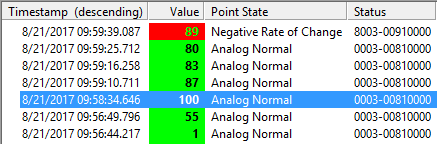
In this example, the newest value older than the time interval is 100 and the updated value is 89. The Rate of Change bit is set because the absolute value of the percentage change is 18.33%, which exceeds the calcparm1 value (10%).
|
Maximum Percentage Change allowed = 10/60 = 0.16667 = 16.67%
Percentage Change = ((89/100) -1) X 100 = -11%
Rate Change = -11/60 = - 0.18333 = -18.33% (absolute value exceeds the maximum percentage change allowed, so alarm bit is set) |
The Positive Rate of Change alarm uses the Change Value Positive Percent (CHANGE_VAL_POS_PCT) calculation. On each update, the system calculates the percentage change between the new value and the newest value older than the time interval, divided by the time interval in seconds, and sets the alarm bit if the value is positive and exceeds the threshold.
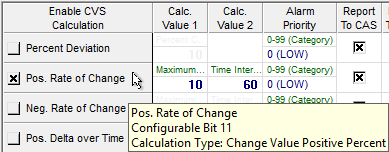
The following image shows the area of an Analog Alarm Settings page of a PNT Editor with an enabled Positive Rate of Change.
Calculation Parameters
Preliminary Calculations:
|
Maximum Percentage Change allowed = calcparm1/calcparm2
Percentage Change = ((Updated Value)/(Newest Val Older than Time Intvl) -1) X 100 |
Equation
|
Rate Change = Percentage Change/calcparm2 |
Example
In this example, the Positive Rate of Change bit is set because the rate of change is positive (23.17%) and exceeds the calcparm1 value (10%).
|
Maximum Percentage Change allowed = 10/60 = 0.16667 = 16.67%
Percentage Change = ((393.214/345.214) -1) X 100 = 13.903%
Rate Change =13.903/60 = 0.2317 = 23.17% (value is positive and exceeds the maximum percentage change allowed, so alarm bit is set) |


The Negative Rate of Change alarm uses the Change Value Negative Percent (CHANGE_VAL_NEG_PCT) calculation. On each update, the system calculates the percentage change between the new value and the newest value older than the time interval, divided by the time interval in seconds, and sets the alarm bit if the value is negative and exceeds the threshold.
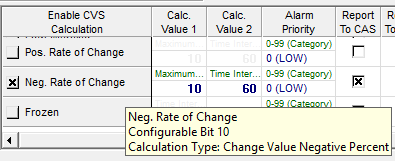
The following image shows the area of an Analog Alarm Settings page of a PNT Editor with an enabled Negative Rate of Change.
Calculation Parameters
Note: The threshold (calcparm1) must still be represented as a positive percentage.
Preliminary Calculations:
|
Maximum Percentage Change allowed = calcparm1/calcparm2
Percentage Change = ((Updated Value)/(Newest Val Older than Time Intvl) -1) X 100 |
Equation
|
Rate Change = Percentage Change/calcparm2 |
Example
In this example, the Negative Rate of Change bit is set because the rate of change is negative (-18.33%) and exceeds the calcparm1 value (10%).
|
Maximum Percentage Change allowed = 10/60 = 0.16667 = 16.67%
Percentage Change = ((89/100) -1) X 100 = -11%
Rate Change = -11/60 = - 0.18333 = -18.33% (value is negative and exceeds the maximum percentage change allowed, so alarm bit is set) |
|
|
|

